Live · Personal workspace
Tracker
Notes that promote themselves to tasks.
// TL;DR
Notes apps capture thoughts but don't move work forward. Task boards move work but kill capture velocity. Tracker is one workspace where a freeform note can be promoted to a kanban card in a single click — and the card keeps a link back to the note that spawned it. Built for individuals, not teams.
The friction between capture and execution is where ideas go to die.
Every productivity workflow I observed (including my own) involved a context switch between a notes tool — Notion, Apple Notes, Obsidian — and an execution tool — Trello, Linear, Asana. The friction of moving an idea from "thing I scribbled" to "thing on the board" is small but happens dozens of times a week. The result is silent loss: ideas captured but never structured, tasks structured but disconnected from the thinking that spawned them. The tax compounds.
Built for one person, not a team.
Tracker is unapologetically a single-user tool. Team productivity software solves a different problem and pays for it in overhead the individual user doesn't need.
- Product managers and individual contributors who think in writing first, execute second
- Indie founders and freelancers who hold their entire backlog in their own head
- Anyone whose work is part exploration and part execution and doesn't want team-grade tooling overhead
I was the first user. Eight months of dogfooding is the research.
The product started as a personal-use prototype because none of the available tools handled the capture-to-execution transition without a tax. I used the earliest version daily, kept a log of friction points, and rebuilt the UX three times based on my own friction. That kind of feedback loop — one user, every day, with strong opinions — is faster than any survey-based discovery would have been for a tool this opinionated.
// Signals
- I lost an average of 4-6 ideas/week to context-switch friction before building this
- Existing tools made me choose between "write fast" and "track structured" — the wedge was the and
- Three rebuilds of the promote-to-task flow before the friction felt invisible
One workspace. Promote anything to anywhere. Refuse the team-shaped feature set.
The strategic call was to merge notes and kanban into one continuous canvas — and to make the promotion gesture so fast that it stops feeling like a context switch. The other call was to refuse the gravity of "team features." Assignments, comments, integrations, notifications — every one of those would have grown the user base and ruined the product for the user it was built for. Saying no to team-shape was harder than the build itself.
// We said NO to
- Team features — assignments, mentions, comments. The whole shape of team productivity tools.
- Cross-device sync — it's an entire backend, and the absence is a privacy story
- Third-party integrations — slack, gcal, github. Each one would erode the focus the tool is built around.
- A mobile-first interface — desktop is where the writing momentum is; mobile is a different problem
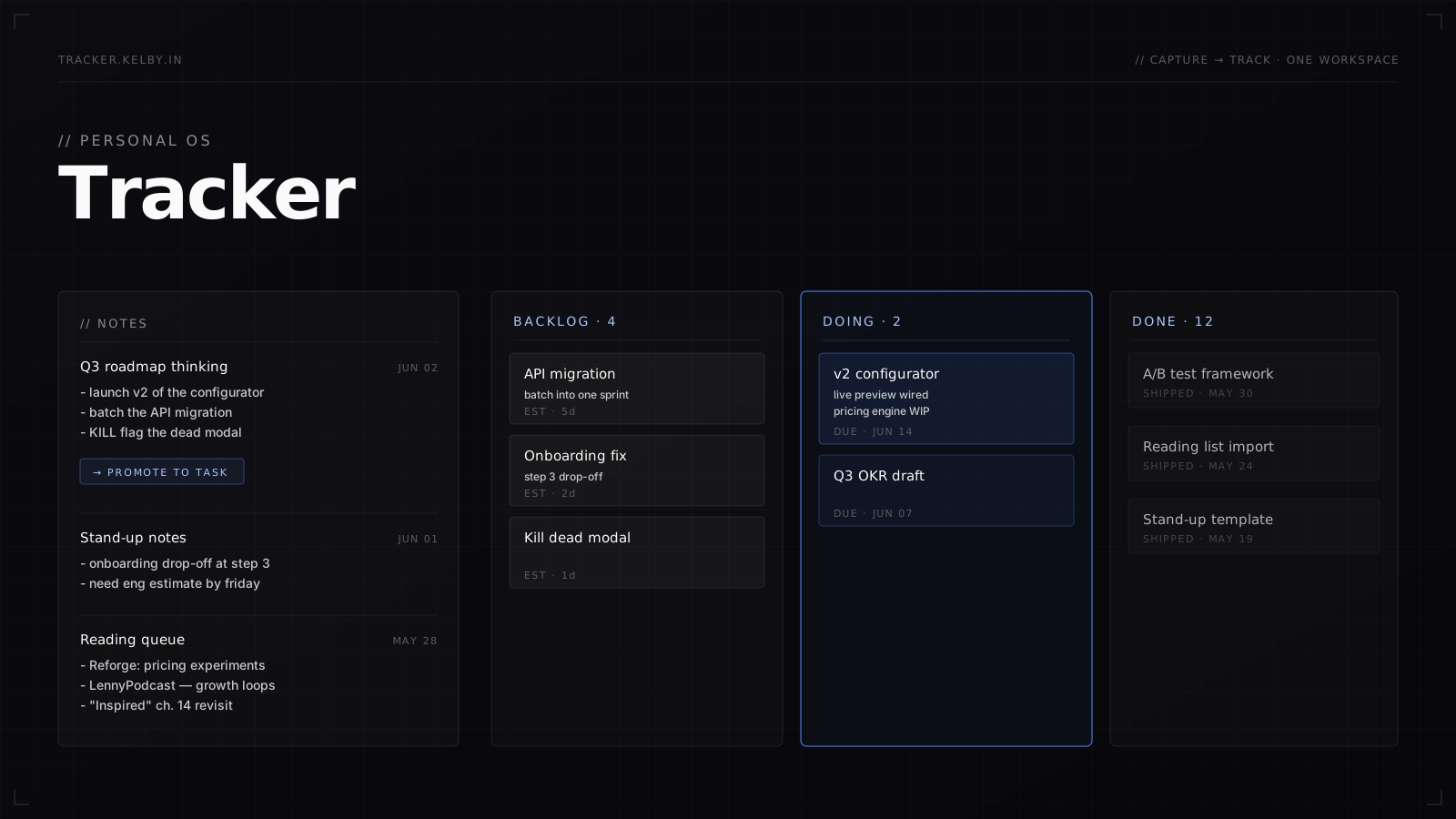
A notes pane on the left, a board on the right. One canvas.
The layout is two-panel and intentional. You write in the notes pane the way you write anywhere — markdown-ish, freeform, fast. Any line, any block, any sub-paragraph can be promoted to a card on the board with a single inline action. The card carries a backlink to the source note so context isn't lost. The board is three columns and stays out of your way until you need it.
Markdown-ish freewriting, no folder structure to maintain, no formatting friction. Capture is the priority — organization is opt-in.
The wedge feature. Highlight a line or block, click promote, and the line becomes a card on the board — with a backlink to the note. Zero context switch.
Backlog / Doing / Done. Deliberately minimal. The board's job is to surface what's active, not to be a system of record.
Data lives in your browser. No accounts, no sync, no telemetry, no risk of your private notes ending up on a vendor's server.
What we deliberately gave up — and what we kept in exchange.
Team features command the market, but they'd ruin the product for the individual user. I chose the smaller, sharper market.
No sync means no cross-device continuity — a real cost. But it also means no auth, no privacy compromise, and a setup time of zero. For the target user, that ratio is worth it.
Every integration would have introduced a notification surface the tool deliberately doesn't have. The point is to be the place you go when you don't want notifications.
The capture-to-execution loop is fundamentally a typing-heavy workflow. Mobile-first would have meant compromising the writing surface, which is the product's reason for existing.
My daily driver for eight months — the meta-evidence that it works.
I've used Tracker as my primary productivity workspace for eight months running. "Where did I write that?" moments have collapsed to near zero. The promote-to-task gesture is now muscle memory — I notice the absence of it when I'm forced to use anything else.
What I'd carry forward.
// Stack